Finding a capable gaming PC under $1,000 can be difficult because prices, configurations, and availability change frequently. Two computers with similar names may also contain different processors, graphics cards, storage, or power supplies.
This guide compares several prebuilt and custom-build options based on their listed components, expected gaming performance, upgrade potential, and overall value. Use the quick comparison below to identify the option that best fits your games, preferred resolution, and willingness to build or upgrade the computer yourself.
Best Gaming PCs Under $1,000: Quick Comparison
| Model | GPU | CPU | RAM | Storage | Best For |
|---|---|---|---|---|---|
| Skytech Nebula | RTX 4060 | Ryzen 5 5600X | 16GB DDR4 | 1TB NVMe | Best overall |
| CyberPowerPC Gamer Master | RX 7600 | Ryzen 5 7600 | 16GB DDR5 | 1TB SSD | Modern AM5 platform |
| iBUYPOWER Trace Mesh | RTX 3060 | Core i5-13400F | 16GB DDR4 | 500GB NVMe | Esports / 1080p |
| Custom Build | Current-generation GPU | Ryzen 5 7600 or similar | 32GB DDR5 | 1TB NVMe | Most customization |
These options represent different approaches to a $1,000 gaming-PC budget, from ready-to-use prebuilts to a customizable DIY system. Always verify the exact CPU, GPU, memory, storage, and price before buying, because manufacturers may sell multiple configurations under similar product names.
CyberPowerPC vs iBUYPOWER (2026 review)
Best Overall: Skytech Nebula (RTX 4060)
- RTX 4060
- Ryzen 5 5600X
- 16GB DDR4-3200
- 1TB NVMe
- B550 motherboard
- 650W Gold PSU
- 4 cooling fans
The Skytech Nebula pairs an NVIDIA RTX 4060 with a Ryzen 5 5600X, 16GB of DDR4 memory, and a 1TB NVMe SSD. This configuration also includes a B550 motherboard, 650W Gold power supply, tower CPU cooler, and four cooling fans.
Why it’s our overall pick: The RTX 4060 and six-core Ryzen 5 5600X make this a well-balanced configuration for 1080p gaming, while the 1TB SSD provides considerably more practical storage than entry-level prebuilts with smaller drives.
Best for: Buyers who want a straightforward RTX 4060 prebuilt without assembling a PC themselves.
Skytech Gaming PCs Review (2026)
Best Value: CyberPowerPC Gamer Master (RX 7600)
The CyberPowerPC Gamer Master pairs an AMD Ryzen 5 7600 with a Radeon RX 7600 8GB graphics card, 16GB of DDR5 memory, and a 1TB PCIe Gen4 NVMe SSD. This specific configuration is model GMA6900WST.
Why it’s our value pick: The Ryzen 5 7600 gives this system a modern AM5/DDR5 platform, while the RX 7600 is aimed at delivering strong gaming performance without stepping up to a more expensive graphics card.
Best for: Buyers who want a modern AMD platform with DDR5 memory and room for future upgrades.
Best for Esports: iBUYPOWER TraceMesh (RTX 3060)
The iBUYPOWER TraceMesh combines an NVIDIA GeForce RTX 3060 8GB with an Intel Core i5-13400F, 16GB of DDR4 memory, and a 500GB NVMe SSD. This specific configuration, TraceMeshI5N3601, also includes a B660 motherboard and 600W 80 Plus Gold power supply.
Why it’s our esports pick: The RTX 3060 and Core i5-13400F provide a balanced CPU/GPU combination, while the Trace 7 Mesh case is designed around a mesh front and airflow.
Best for: Players focused primarily on competitive games who also want enough GPU performance for more demanding titles.
Why $1,000 Matters for a Gaming PC
A $1,000 budget gives you substantially more flexibility than an entry-level gaming PC. At this price, the goal is to put more of the budget toward a capable graphics card and processor while still getting adequate memory, SSD storage, cooling, and a quality power supply.
- Strong 1080p Performance
GPUs such as the RTX 4060 and RX 7600 are well suited to 1080p gaming. Both can also handle 1440p in many games, although performance depends heavily on the game, graphics settings, and whether technologies such as upscaling are used. Benchmark results show significant differences from one game to another, which is why a single FPS estimate isn’t useful for every title.
- Enough Hardware for Gaming and Everyday Multitasking
A system with a modern six-core processor and 16GB of memory gives you a practical foundation for gaming while also running common background applications. If streaming or recording is important to you, pay attention to the specific CPU, GPU, and memory configuration rather than assuming every $1,000 PC will perform the same.
- Better Component Balance
At this budget, you don’t have to focus exclusively on the GPU. You can look for a system that combines capable gaming hardware with sufficient SSD storage, cooling, and a properly sized power supply.
That balance matters because a gaming PC is more than its graphics card.
- More Room to Upgrade
Upgrade potential depends on the individual PC, but standard desktop components can make future changes easier. When comparing systems, check the motherboard platform, power supply, case space, available memory slots, and storage expansion options.
A well-chosen system gives you the option to upgrade individual components later instead of immediately replacing the entire computer.
What to Look for in a $1,000 Gaming PC
Before choosing a prebuilt or building your own, focus on the components that have the biggest effect on gaming performance, reliability, and future upgrades.
If you’re comparing prebuilt brands, our CyberPowerPC vs iBUYPOWER guide takes a closer look at their different configurations.
GPU (Graphics Card)
For a gaming-focused PC, the graphics card should be one of your highest priorities.
The RTX 4060 and RX 7600 featured in this guide are examples of GPUs designed for mainstream gaming. An RTX 3060 can also be worth considering in the right prebuilt, particularly if the complete system is competitively priced.
Rather than choosing a PC based on the GPU name alone, compare actual gaming benchmarks for the resolution and games you plan to play.
CPU (Processor)
Look for a processor that complements the graphics card without consuming too much of your budget.
The systems in this guide include CPUs such as:
Ryzen 5 5600X
Ryzen 5 7600
Core i5-13400F
All three provide six or more CPU cores, but they use different platforms and memory generations. Consider both current performance and the upgrade options available on the motherboard.
I would completely remove the current“Avoid Intel i3, Ryzen 3, older Intel CPUs, and any CPU with only 4 cores” rule. Your article currently presents that as universal advice, and it isn’t necessary for helping the reader evaluate these particular PCs.
RAM
16GB of RAM is a practical starting point for the PCs covered in this guide.
Also check whether the system uses DDR4 or DDR5 and whether there are free memory slots if you want to upgrade later.
If a system includes less memory, factor the cost of an upgrade into your comparison.
Storage
Aim for a 1TB NVMe SSD when the budget allows.
A 500GB SSD can work, but modern game libraries can fill it quickly. Also check whether the motherboard has additional M.2 or SATA connections if you expect to add more storage later.
Cooling and Airflow
Look for a case with unobstructed airflow and enough intake and exhaust ventilation for the installed hardware.
A mesh-front case can be useful, but don’t judge cooling solely by the number of fans. Case design, fan placement, CPU cooler, and the heat produced by the components all play a role.
Power Supply
Don’t judge a power supply by wattage alone.
Check that the PSU provides enough capacity for the specific CPU and GPU combination, and consider its manufacturer, model, efficiency rating, protections, and available connectors. PSU requirements depend on the complete system rather than simply its price.
For example, current PSU-sizing guidance lists roughly 550–600W for systems built around GPUs such as the RTX 4060 or RX 7600, while power-supply calculators determine the requirement from the entire component configuration.
If you’re buying a prebuilt and the manufacturer doesn’t identify the power-supply model, that’s something worth checking before purchasing.
Best Gaming PCs Under $1,000: Top Picks for 2026
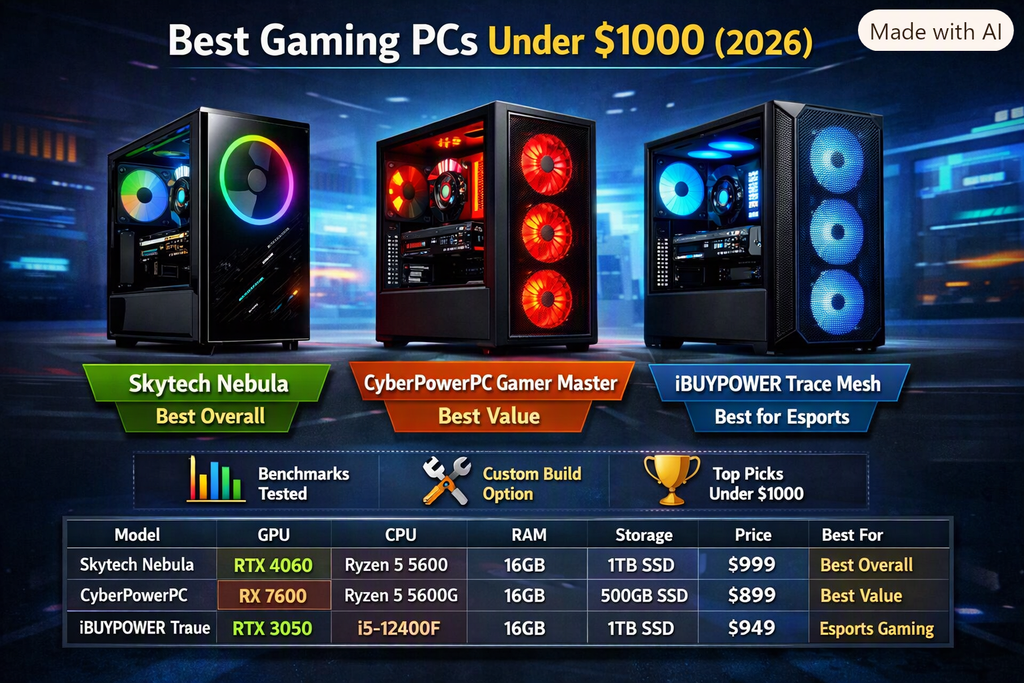
The three prebuilts below take different approaches to a sub-$1,000 gaming PC. Compare the exact CPU, GPU, memory, storage, and upgrade platform before buying, because configurations and availability can change.
- Skytech Nebula with RTX 4060
Build Specs
GPU: NVIDIA GeForce RTX 4060
CPU: AMD Ryzen 5 5600X
RAM: 16GB DDR4-3200
Storage: 1TB NVMe SSD
Motherboard: B550
PSU: 650W Gold
Cooling: Tower CPU cooler with four case fans
Those are the specifications Skytech lists for its RTX 4060 / Ryzen 5 5600X Nebula configuration.
Performance
This configuration is primarily suited to 1080p gaming, with 1440p performance varying substantially by game. Skytech’s published estimates illustrate that variation: Cyberpunk 2077 is listed at 90 FPS at 1080p and 50 FPS at 1440p, while less demanding games can run considerably faster. Actual performance can vary.
Pros
RTX 4060 graphics
1TB NVMe storage
650W Gold power supply
Four case fans
B550 motherboard
Cons
Uses the older AM4/DDR4 platform
This exact configuration is currently listed as out of stock by Skytech
Best For
Buyers looking for an RTX 4060 prebuilt with 1TB of storage, provided this configuration is available at a competitive price.
- CyberPowerPC Gamer Master with RX 7600
Build Specs
GPU: AMD Radeon RX 7600 8GB
CPU: AMD Ryzen 5 7600
RAM: 16GB DDR5
Storage: 1TB SSD
Model: GMA6900WST
Those specifications match the GMA6900WST configuration.
Performance
The combination of an RX 7600 and Ryzen 5 7600 makes this a gaming-focused configuration built on AMD’s newer AM5/DDR5 platform.
Rather than publishing a single FPS range for every game, compare benchmarks for the specific games and resolutions you intend to use.
Pros
Ryzen 5 7600 processor
DDR5 memory
1TB SSD
AM5 platform
Cons
Availability and pricing can vary
The GMA6900WST listing I verified is currently out of stock at Walmart
Best For
Buyers who prioritize a newer AMD platform and DDR5 memory.
- iBUYPOWER TraceMesh with RTX 3060
Build Specs
GPU: NVIDIA GeForce RTX 3060 8GB
CPU: Intel Core i5-13400F
RAM: 16GB DDR4-3200
Storage: 500GB M.2 NVMe SSD
Motherboard: B660
PSU: 600W 80 PLUS Gold
Case: Trace 7 Mesh ARGB
These are iBUYPOWER’s specifications for model TraceMeshI5N3601.
Performance
This configuration combines the RTX 3060 with Intel’s Core i5-13400F. iBUYPOWER publishes a 245-FPS result for Counter-Strike 2 for this system, although performance will vary by game and settings.
Pros
Core i5-13400F
RTX 3060 8GB
Mesh-front case
600W 80 PLUS Gold PSU
Cons
500GB storage is smaller than the 1TB drives in the other two configurations
Uses DDR4 rather than DDR5
This is an older configuration launched in May 2023
Best For
Buyers focused on esports and 1080p gaming who find this particular configuration at an attractive price.
Best Custom Gaming PC Build Under $1,000
Building your own PC gives you control over each component, but the final configuration depends on current prices. Instead of treating one parts list as permanently under $1,000, use the following as a starting point and verify the total before ordering.
Recommended Parts Target
CPU: AMD Ryzen 5 7600 or a similarly priced six-core processor
GPU: The strongest current-generation graphics card that fits the completed budget
Motherboard: B650 motherboard compatible with the selected processor
RAM: 32GB DDR5, preferably as a matched two-stick kit
Storage: 1TB NVMe SSD
Power supply: 650W from an established manufacturer, with the correct connectors for the graphics card
Case: Airflow-focused case compatible with the motherboard, graphics card and CPU cooler
CPU cooling: Compatible air cooler or the processor’s included cooler, when supplied
How to Allocate the Budget
Prioritize the graphics card because it will usually have the greatest effect on gaming performance. After that, choose a compatible processor and motherboard without cutting essential costs such as the power supply, storage and cooling.
Current under-$1,000 build recommendations vary considerably. One October 2026 guide uses an AM5 system with a Ryzen 5 9600X, RX 9060 XT and 32GB of DDR5, but it also warns that hardware prices fluctuate daily.
For that reason, verify the complete cost and compatibility immediately before buying.
Advantages of Building Your Own PC
Control over the exact components
Ability to choose the case, cooling and power supply
Easier comparison of component warranties
Greater flexibility when planning later upgrades
Disadvantages of Building Your Own PC
Requires assembly and operating-system setup
Parts must be checked for compatibility
Warranty service may involve multiple manufacturers
Troubleshooting is the builder’s responsibility
Best For
Buyers who are comfortable selecting compatible components, assembling the system and adjusting the parts list as prices change.
Prebuilt vs Custom Build — Which Should You Choose?
Choose Prebuilt If:
- You want plug‑and‑play convenience
- You don’t want to assemble parts
- You want a simple warranty
- You want a clean, ready‑to‑use system
Choose Custom Build If:
- You want maximum performance
- You want better components
- You want better airflow
- You want long‑term upgrade potential
Final Recommendation
If you want the best value under $1000:
Best Prebuilt:
Skytech Nebula (RTX 4060) — strongest overall performance
Best DDR5 Prebuilt:
CyberPowerPC Gamer Master (RX 7600) — modern platform + great multitasking
Best Custom Build:
Ryzen 5 7600 + RTX 4060/RX 7600 — unbeatable performance per dollar
No matter which option you choose, a $1000 gaming PC in 2026 delivers excellent performance, strong longevity, and a great balance of price and power. Overall, the best gaming PCs under $1000 deliver excellent value, strong performance, and long‑term upgrade potential. The best gaming PCs under $1000 offer excellent value, strong frame rates, and long‑term upgrade potential.
GPU Benchmarks & Performance
- Tom’s Hardware GPU Hierarchy
https://www.tomshardware.com/reviews/gpu-hierarchy(tomshardware.com in Bing) - TechPowerUp GPU Database https://www.techpowerup.com/gpu-specs/
✔ CPU Benchmarks
- CPU Benchmark Rankings (PassMark)
https://www.cpubenchmark.net/cpu_list.php(cpubenchmark.net in Bing) - UserBenchmark CPU Comparison https://cpu.userbenchmark.com/
✔ Gaming Performance Benchmarks
- Hardware Unboxed Benchmark Charts https://www.hardwareunboxed.com/
- Gamers Nexus Testing Data https://www.gamersnexus.net/
A $1000 gaming PC in 2026 can deliver serious performance — if you pick the right components. The Skytech Nebula is the best overall prebuilt, CyberPowerPC offers the best value, and a custom RTX 4060 build delivers the strongest performance for the price.
If you want the best possible gaming experience under $1000, start with the comparison table above and choose based on your performance needs.
No matter which option you choose, each recommendation here qualifies as one of the best gaming PCs under 1000 in 2026.
FAQ — Best Gaming PCs Under $1000 (2026)
Is $1000 enough for a good gaming PC?
Yes — $1000 gets you an RTX 4060 or RX 7600, which handles 1080p Ultra and 1440p High.
Which brand is best under $1000?
Skytech and CyberPowerPC offer the best value in 2026.
Is a custom build better than a prebuilt?
Yes — custom builds offer better GPUs and thermals for the same price.
Can a $1000 PC run 1440p?
Yes — RTX 4060 builds can run 1440p High at 80–110 FPS.
What is the best gaming PC under 1000 in 2026?
The Skytech Nebula and the custom RTX 4060 build are currently the best gaming PCs under 1000 based on benchmarks.
3 thoughts on “Best Gaming PCs Under $1,000 in 2026”